CSV phone column workflow
CSV Phone Number Formatter for US & Canada (+1/NANP) Lists
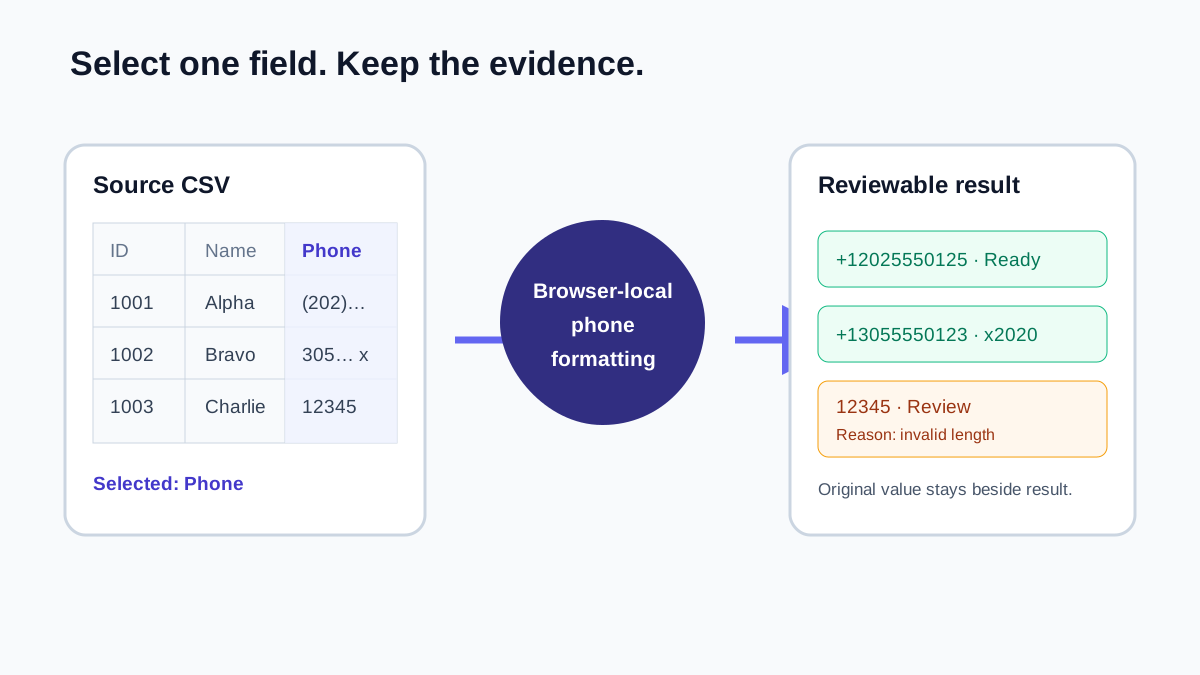
Standardize a CSV phone column before a CRM, dialer, or spreadsheet import. PrimeDialPRO lets you select the phone field, processes the list in your browser, and keeps every original value beside its formatted result.
- Paste a column or upload UTF-8 CSV/TXT directly in this browser tool
- Choose the phone field when a CSV contains several columns
- Copy or download filtered cleaned rows with source columns intact
- Core phone-list processing remains inside the browser
CSV phone formatter
Select and format a CSV phone column
Quick answer
A phone-first CSV cleanup workflow
Select the actual phone field, standardize supported values, and keep uncertain entries visible for review. Headered pasted examples and uploaded CSVs show every source field beside appended cleaned output, and the copy, CSV, TXT, and JSON actions use those cleaned rows.
Bring
A CSV with one phone column or several fields such as customer ID, ZIP code, name, and phone.
Get
Every source field plus cleaned phone, extension, structure-check status, and review reason in the row-aware outputs.
Double-check
The selected column, review rows, chosen secondary-result filter, and the destination system’s required format.
Practical workflow
Clean a CSV phone column without touching the rest of the file
Start with the right field, keep review rows visible, and treat the exported phone results as a controlled cleanup layer for your source CSV.
- 1
Choose the phone column
Upload the original CSV and select its phone field when multiple numeric columns are present. This keeps IDs, ZIP codes, dates, and invoice values out of the candidate list.
- 2
Standardize and review
Select the required output format, process the list, and inspect entries flagged for review instead of silently discarding them.
- 3
Export with originals intact
Download the all-source Working CSV for review, or filter the copy, CSV, tab-delimited TXT, or JSON output to Ready or Review rows. For headered CSV data, each option retains the source fields and appends the cleaned result fields.
How to prepare a CSV phone column
Choosing the right column is the small step that prevents a big mess. When PrimeDialPRO sees a multi-column CSV, select the phone field so customer IDs, postal codes, invoice numbers, and dates do not become accidental phone candidates.
A text header is recognized and skipped for the selected column. For a quicker job, you can also paste one number per line or use a single comma-delimited phone column.
- Save a copy of the original export.
- Select the correct phone column before processing.
- Use UTF-8 CSV or plain text and stay within the displayed file-size limit.
| Check | Use here | Why it matters |
|---|---|---|
| Encoding | UTF-8 CSV or plain text | Keeps ordinary text predictable. |
| Delimiter | Comma-delimited CSV | Choose the phone field after the file is read. |
| Quoted fields | Keep commas and line breaks quoted | Quoted punctuation stays with its field. |
| Schema | Keep a consistent header and field layout | IDs and non-phone columns remain separate from the phone selection. |
Choose the CSV output for the next step
The Working CSV is the all-source primary export: it keeps the source rows and appends cleanup fields for review. It is not narrowed by the Ready or Review filter. Copy, CSV, tab-delimited TXT, and JSON use the selected filter and retain those same source and cleaned fields when the input is a headered CSV.
This CSV workflow does not remove duplicates. Use the dedicated duplicate-removal workflow when you need its keep-first, Cleaned CSV, and Duplicates CSV audit behavior.
- Ready and Review filters change only the filtered copy, CSV, TXT, and JSON membership.
- The all-source Working CSV remains available for reconciliation.
- No new phone representation or URI output is added here.
| Output | Use | Not provided |
|---|---|---|
| Working CSV | All source rows plus cleanup fields for review. | A universal import template or a filter-dependent export. |
| Filtered copy, CSV, TXT, or JSON | Selected source rows plus appended cleaned fields. | Duplicate removal or an international or URI phone representation. |
| Formatted value and extension | Map the base number and extension deliberately. | Carrier, assignment, or reachability verification. |
Understand Working CSV and phone-result fields
The all-source Working CSV retains every source column and appends PrimeDialPRO cleanup fields for the selected phone column. Filtered copy, CSV, tab-delimited TXT, and JSON retain the same row shape for the selected Ready or Review membership. Plain one-number-per-line input remains a phone-only result because it has no additional source fields.
Matches_Supported_Structure means the entry passed the tool’s basic NANP area-code, central-office, length, and +1 checks; it is not a carrier or deliverability verdict. Extensions remain separate so a destination can map the base number and extension deliberately.
- Working CSV appends PrimeDialPRO_Cleaned_Phone, PrimeDialPRO_Extension, PrimeDialPRO_Status, and PrimeDialPRO_Review_Reason.
- Filtered row exports include every source header plus the same four appended PrimeDialPRO fields.
- Source-preserving CSV and TXT output prefix formula-like source cells with one apostrophe to reduce spreadsheet formula interpretation risk; generated cleaned fields are left unchanged.
| Output | Fields to expect | Filter behavior |
|---|---|---|
| Working CSV | Every source column plus appended PrimeDialPRO cleanup fields. | Always all source rows; not narrowed by Ready or Review. |
| Filtered CSV, TXT, or JSON | Every source column plus appended PrimeDialPRO cleanup fields. | Contains only the selected Ready or Review row membership. |
| Filtered copy | The same cleaned-row table in tab-delimited form. | Contains only the selected Ready or Review row membership. |
Format CSV phone numbers in your browser
Phone-list parsing and formatting run in the browser. PrimeDialPRO does not send the pasted list or uploaded file to its server for processing. The website still uses ordinary web services described in the privacy policy, so organizations should apply their own data-handling rules before working with customer information.
Practice resource
Inspect a fictional CSV before and after phone cleanup
Use the paired files to test column selection, UTF-8 text, commas inside quoted fields, extensions, and review rows without exposing customer data.
Delimiter and encoding
The sample uses comma delimiters and UTF-8. Quoted commas stay inside a field. PrimeDialPRO reports malformed CSV rather than silently shifting fields.
Review fields
The expected output retains the source row and appends cleaned phone, extension, status, and review reason so uncertain values remain auditable.
CSV phone-number cleanup examples
A selected phone field keeps unrelated numeric data out, while extensions and review values stay visible instead of being silently discarded.
| Input | Result | Meaning |
|---|---|---|
1001,20001,"(202) 555-0125" | +12025550125 | Phone selected; ID and ZIP excluded |
305 555 0123 x2020 | +13055550123 · x2020 | Extension separated |
(202) 555-0125 | +12025550125 | One formatted result in the selected phone field |
12345 | 12345 | Flagged for review |
CSV phone-number formatter questions
Can I upload a CSV with names, addresses, and several numeric columns?
Yes. Every CSV column remains available. When there is not exactly one credible phone header, choose the phone field before processing so IDs, dates, ZIP codes, and other values are not treated as candidates.
Does this CSV formatter remove duplicate phone values?
No. This CSV formatter keeps the all-source Working CSV and provides filtered cleaned-row outputs. Use the dedicated duplicate-removal workflow when you need keep-first behavior and Cleaned or Duplicates CSV audits.
Does the CSV export remove entries that need review?
No. The Working CSV remains all source rows with appended cleanup fields. Ready and Review filters narrow only the filtered copy, CSV, TXT, or JSON output.
Is the uploaded CSV sent to PrimeDialPRO?
The core file reading, parsing, formatting, and CSV generation occur in your browser. Review the privacy policy for analytics and other ordinary website services.
Policies and references
Related phone converters and workflows
Continue with the next workflow or browse the full directory.