International list converter
International phone number converter
Convert a pasted list or headered CSV into reviewable international phone formats without uploading the list.
- Paste newline-separated values or upload a headered CSV
- Choose a phone field and one explicit region mode for CSV
- Copy Ready E.164, international, national, or RFC3966 values
- Download all-row results or source-preserving CSV reports
Try it now
Convert international phone lists to several display formats
Paste newline-separated values, or upload a headered CSV. File reading, processing, copying, and downloads stay in this browser.
0 of 10,000 nonblank rows · 0 of 250,000 UTF-8 bytes
CSV only, UTF-8, up to 250,000 bytes. Choose the phone column and a region mode after reading.
Choose input to begin.
Packaged metadata cannot show assignment, carrier, owner, reachability, or deliverability.
Quick answer
A browser-local workflow for international phone lists
The converter parses each row with packaged numbering metadata, separates rows that need review, and keeps source columns aligned in CSV exports.
Input
Use newline-separated text or a comma CSV with headers.
Region choice
Choose a default region or a separate region column, never both.
Output
Copy Ready pasted values, download an all-row paste report, or download source-preserving file reports. E.164 copy contains the base number only; RFC3966 can carry an extension with ;ext=.
Practical workflow
Convert a list without changing your source file
Use a copied list or a CSV export, select explicit inputs, then review the generated formats before using them elsewhere.
- 1
Provide values
Paste up to 10,000 nonblank rows and 250,000 UTF-8 bytes, or select a UTF-8 comma CSV under the file limit.
- 2
Select context
Choose the intended phone column and the needed region context.
- 3
Review, copy, or export
Copy Ready values in the selected format or download an all-row CSV with status and review details.
What the results mean
Parsed means the input could be interpreted with the selected context. Possible length and metadata-rule matching are separate checks.
Packaged metadata cannot establish assignment, carrier, owner, reachability, or deliverability.
- Ready rows have a parsed, possible number that matches packaged numbering-plan rules.
- Review rows need a region, have an ambiguous region, or need another source check.
CSV input and export safety
CSV upload accepts headered, comma-delimited UTF-8 files only. Choose a phone column explicitly; a region column is optional only when that mode is selected.
Exports retain source rows and add international result columns. Formula-like uploaded source headers and source cells receive a spreadsheet-safe leading apostrophe. Generated E.164, international, national, RFC3966, status, and review fields remain literal and unchanged.
Practice resource
Conversion flow
Uses packaged libphonenumber-js@1.13.9/max metadata, not live carrier, assignment, or reachability data.
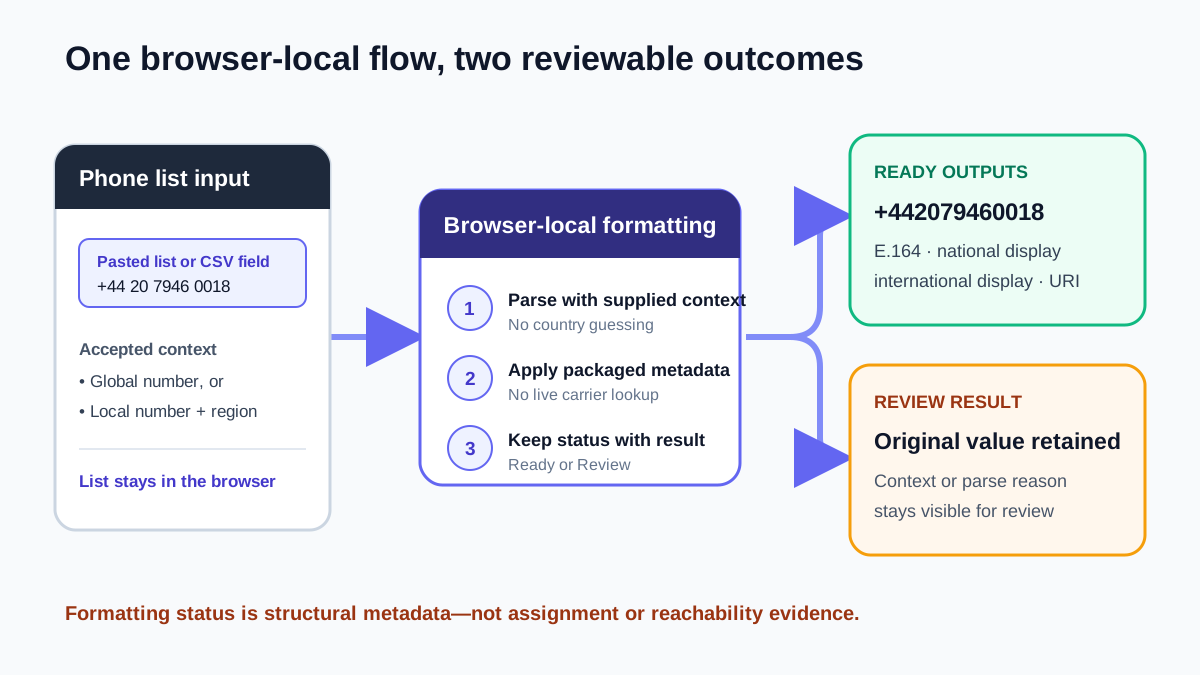
| Context | Output | Boundary |
|---|---|---|
| +44 20 7946 0018 | +442079460018 | Ready format |
| 020 7946 0018 with GB | +442079460018 | Explicit context |
| 020 7946 0018 without region | Review | No guess |
Result fields at a glance
Use your own data in the tool; these labels describe the output rather than publishing phone examples.
| Input | Result | Meaning |
|---|---|---|
+44 20 7946 0018 | +442079460018 | Ready E.164. |
020 7946 0018 (GB) | +442079460018 | Explicit context. |
+1 202 555 0125 | +12025550125 | Ready E.164. |
International converter questions
Does this upload my CSV?
No. Processing stays in the browser.
Does Ready prove reachability?
No. It is a metadata result.
What metadata is used?
Packaged libphonenumber-js@1.13.9/max, not live data.
Policies and references
Related phone converters and workflows
Continue with the next workflow or browse the full directory.