CSV phone deduplication
Remove Duplicate Phone Numbers from a CSV
Normalize values from US and Canada lists that match basic +1/NANP structure before comparison so punctuation and a leading 1 do not hide repeated numbers.
- Find duplicates hidden by spaces, punctuation, or a leading 1
- Keep extensions distinct when the base number is shared
- Retain the first visible result instead of silently rewriting every row
- Export reviewable phone results without uploading the source list
Duplicate phone number remover
Normalize and remove CSV duplicates
Quick answer
Normalize first, then compare phone numbers
Exact-text matching misses duplicates whenever the same number uses different punctuation or includes a leading 1. PrimeDialPRO standardizes supported phone values before comparison, keeps extensions distinct, and leaves uncertain entries in a separate review path.
Catches
Supported phone values disguised by parentheses, spaces, dots, dashes, or an optional leading country code 1.
Keeps separate
The same base number with different extensions, plus review values that cannot be normalized safely.
Does not do
Merge full customer records or decide whether a shared home, office, or switchboard number should be deleted.
Practical workflow
Normalize, compare, and review duplicate phone numbers
Deduplication works best as a reviewable cleanup step: select the phone field, compare normalized results, then decide what belongs in the source system.
- 1
Select the phone field
Open the bulk formatter, upload the CSV, and choose the intended phone column when the file contains several numeric fields. Keep an untouched copy of the full source file.
- 2
Normalize before comparison
Choose an output format and process the list. Supported values are normalized before duplicate comparison so cosmetic differences do not hide the same base number.
- 3
Remove repeats and review
This page automatically keeps the first matching phone result. Inspect retained and removed results, then review the source-preserving Cleaned CSV and Duplicates CSV before applying a source-system decision.
Why CSV phone duplicates hide in plain sight
A CSV can contain the same supported phone number as (202) 555-0125, 202-555-0125, 202.555.0125, or 1 202 555 0125. To a spreadsheet’s exact-text check, those are four different strings. After phone-aware normalization, they resolve to the same supported +1 base value.
PrimeDialPRO first separates a recognized extension, removes common punctuation from the base number, and applies its basic NANP structure check. Ready results can then be compared consistently instead of relying on the original punctuation.
- Ten digits and eleven digits beginning with 1 are normalized to the supported base number.
- The area code and central-office code must each begin with 2–9 for a ready result.
- Formatting does not establish ownership, reachability, consent, or whether two rows describe the same person.
How PrimeDialPRO identifies duplicate phone numbers
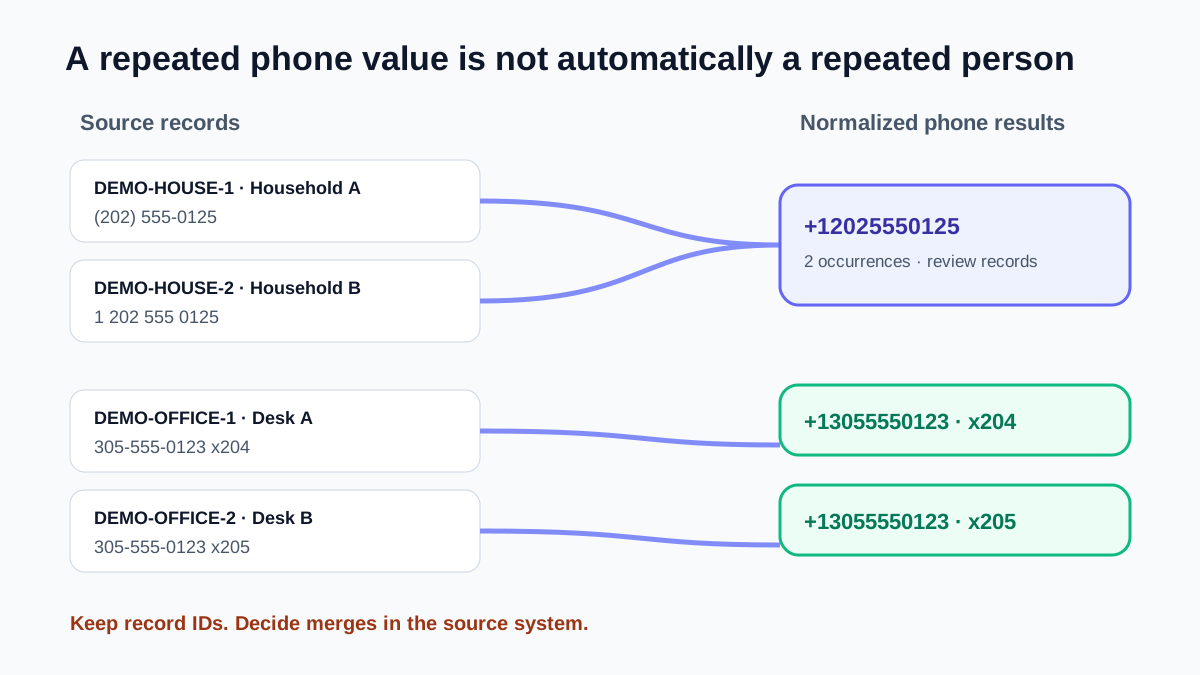
For ready rows, the duplicate key contains the formatted number and the separated extension. Two rows with the same base number but different extensions remain separate because they may reach different desks. Repeated ready rows with the same formatted number and extension collapse to the first visible occurrence.
Rows that need review use a different rule: only repeated trimmed, lowercase original values collapse. PrimeDialPRO does not force malformed or uncertain inputs into a normalized number simply to make deduplication more aggressive.
This quick page applies keep-first deduplication automatically. Its counts and preview follow that retained result set, while its Cleaned CSV and Duplicates CSV preserve the complete source rows and append cleaned phone, extension, status, and review details for retained and removed results. Confirm the count and sample both outputs before downloading.
| Result or output | What PrimeDialPRO does | What it does not decide |
|---|---|---|
| Same ready number and extension | Keeps the first visible phone result. | Whether the full source records represent the same person. |
| Same base number, different extensions | Keeps both results. | Which extension belongs in a destination field. |
| Review value | Leaves it for review rather than forcing normalization. | How to correct it without the original source. |
| Cleaned and Duplicates CSVs | Preserve source rows and append the processed phone result for retained and removed entries. | A CRM merge, keep-last choice, or a new phone format. |
Deduplicate phone values—not customer records
The formatter works on the selected phone values and produces phone-result fields. It does not compare names, email addresses, account IDs, timestamps, or record ownership, and it does not merge the other columns from two customer rows. A shared household, switchboard, or support number can legitimately appear on several records.
Think of the deduplicated list as a cleanup clue, not an automatic delete instruction. Keep the original CSV, choose the authoritative customer row in the source system, and test a small downstream import before applying a broad update.
- A duplicate phone value does not always mean a duplicate person.
- A shared number may belong on several legitimate records.
- Keep IDs and other record fields available for the final merge decision.
Keep CSV phone cleanup in the browser
Column detection, phone formatting, filtering, duplicate removal, and export generation run in the browser. PrimeDialPRO does not intentionally send the uploaded phone-list contents to its server for processing. Review the privacy policy for ordinary site analytics and apply your organization’s own handling rules to customer data.
Practice resource
Compare phone-value deduplication with record matching
The diagram and sample make the safety boundary explicit: repeated normalized phone values are review signals, not permission to delete full customer records.
| Operation | Compared fields | Safe conclusion |
|---|---|---|
| PrimeDialPRO phone deduplication | Formatted base number plus extension | These phone results repeat in the processed uploaded source. |
| Row-level exact deduplication | Every exported field | These rows are byte-for-byte equivalent. |
| CRM record matching | IDs, names, ownership, timestamps, organization rules | A configured source-system process may identify candidate records to merge. |
Phone-number deduplication examples
The same normalized base number can collapse while a different extension stays separate and an unsupported value remains available for review.
| Input | Result | Meaning |
|---|---|---|
(202) 555-0125 | +12025550125 | First ready occurrence retained |
1 202 555 0125 | Duplicate removed | Same normalized base number |
202-555-0125 x204 | +12025550125 · x204 | Different extension remains separate |
12345 | Review | Not coerced into a valid duplicate key |
Duplicate phone-number cleanup questions
Does Remove duplicates compare the original punctuation?
Not for ready rows. It compares the formatted number and separated extension, allowing supported punctuation variants and a leading country code 1 to resolve to the same key.
Will two identical base numbers with different extensions be removed?
No. The extension is part of the ready-row duplicate key, so different extensions remain separate results.
Does PrimeDialPRO merge duplicate customer records?
No. It deduplicates the selected phone-result list only. It does not decide which complete CRM record is authoritative or merge names, emails, IDs, or other source fields.
Is my CSV uploaded for duplicate checking?
The core CSV parsing, formatting, duplicate removal, and export generation occur in the browser. Review the privacy policy for analytics and other ordinary website services.
Policies and references
Related phone converters and workflows
Continue with the next workflow or browse the full directory.