NANP to E.164-style output
E.164-Style Converter for US & Canada (+1/NANP Lists)
Convert values from US and Canada lists that match basic 10-digit or leading-1 NANP structure into consistent +1 output. The tool does not detect a NANP country or territory and is not a general international parser.
- Outputs values such as +14155550199
- Accepts 10 digits or 11 digits beginning with 1
- Separates common extension markers before formatting
- Copies and exports literal +1 E.164-style values by default
E.164 converter
Convert supported +1 numbers to E.164
Quick answer
Turn supported +1 numbers into consistent E.164-style values
Paste a 10-digit NANP-shaped value or an 11-digit value beginning with 1. PrimeDialPRO removes common punctuation, checks basic NANP prefixes, and returns a compact value such as +14155550199 when the structure is supported.
Input
Ten digits, or eleven digits beginning with country code 1, with common spaces and punctuation allowed.
Output
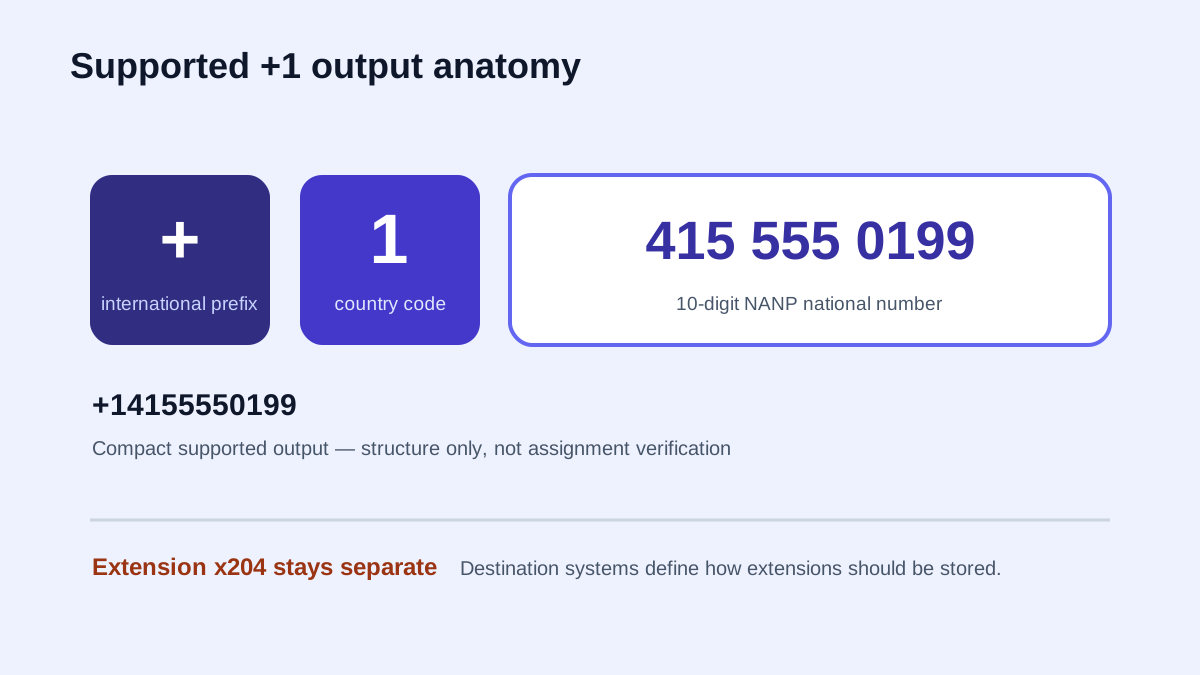
A plus sign, country code 1, and the 10-digit national number—with any recognized extension kept separate.
Scope
Basic +1/NANP structure only; no international country detection, carrier lookup, or reachability check.
Practical workflow
Convert NANP numbers to E.164-style output
The conversion itself is simple. The important part is confirming that the input fits the supported +1 scope and that the destination stores extensions separately.
- 1
Supply a supported NANP number
Paste a 10-digit number or an 11-digit number beginning with 1. Spaces, dots, dashes, and parentheses are removed during formatting.
- 2
Select E.164 output
The formatter normalizes the national number to ten digits and emits a plus sign, country code 1, and the ten-digit national number.
- 3
Verify destination requirements
Confirm the importing API, CRM, or calling platform accepts +1 E.164-style strings and determine how it expects extensions to be stored.
What E.164-style phone formatting means here
E.164 is the ITU-T international public telecommunication numbering plan. A globally presented number uses a country code followed by the remaining national number, and the complete international number is limited to 15 digits. In common text and software workflows, a leading plus sign signals that international-style presentation.
PrimeDialPRO accepts 10-digit values or 11-digit values beginning with 1. Country code 1 covers the wider NANP; the tool does not determine a value’s NANP country or territory, validate area-code assignment, interpret international trunk prefixes, or support other country codes.
- Example input: (415) 555-0199.
- Example output: +14155550199.
- Recognized extension: stored beside the base number, not inside it.
E.164 formatting is not phone verification
A value can have the expected length and still be unassigned, disconnected, mistyped, or unsuitable for a particular channel. PrimeDialPRO does not contact a carrier or subscriber, and it does not identify mobile, landline, or VoIP service.
Use the result as consistent storage or interchange formatting. Use an appropriate carrier or verification service when your workflow requires assignment, line type, consent, or reachability checks.
- Structure check: supported here.
- Carrier and line type: not checked.
- Reachability and consent: not checked.
Keep phone extensions outside the E.164 number
Common markers such as ext, extension, x, and # are separated before the base number is formatted. The extension is not appended to the E.164-style value because extension storage is application-specific. Keep it in a separate destination field whenever possible, and confirm the receiving CRM or calling platform’s rules.
Practice resource
See what changes—and what PrimeDialPRO does not offer
The structure diagram explains the supported +1 output. The comparison distinguishes storage and display formats without implying global validation.
| Representation | Fictional example | Available here |
|---|---|---|
| +1 E.164-style | +14155550199 | Yes |
| National display | (415) 555-0199 | Yes |
| Digits only | 4155550199 | Yes |
| International display | +1 415 555 0199 | No dedicated output |
| RFC3966 URI | tel:+1-415-555-0199 | No |
| Global country parsing | +44 … → detected country | No |
E.164-style phone conversion examples
Supported +1 inputs become one consistent shape. Extensions remain separate, and numbers outside the tool’s NANP scope stay in review.
| Input | Result | Meaning |
|---|---|---|
(415) 555-0199 | +14155550199 | 10-digit NANP input |
1 212 555 0125 | +12125550125 | Leading country code normalized |
305 555 0123 x2020 | +13055550123 · x2020 | Extension remains separate |
+44 20 7946 0958 | Review | International input is not supported |
E.164 phone-number converter questions
Does PrimeDialPRO support every E.164 country code?
No. It accepts 10-digit values and 11-digit values beginning with 1 when they match basic NANP prefix rules. It does not determine which NANP country or territory a value belongs to.
Is an E.164-formatted number guaranteed to be valid?
No. Correct-looking structure does not establish assignment, carrier, line type, reachability, or consent.
Should an extension be part of the E.164 number?
PrimeDialPRO separates extensions and leaves them outside the formatted base number. Store the extension in a separate field according to the destination system’s documentation.
Do copy and download add spreadsheet text markers?
No. This E.164 page keeps the generated +1 value literal for interchange. Use the Excel-specific formatter when you explicitly need apostrophe-prefixed spreadsheet text markers.
Policies and references
Related phone converters and workflows
Continue with the next workflow or browse the full directory.